
W33Workflow · Product
Product reference sheet
Your product photo plus its back, top and side, laid out in one reference sheet.
- Price
- Credits
- Goes in
- 1
- Steps
- 2
- At once
- Up to 1
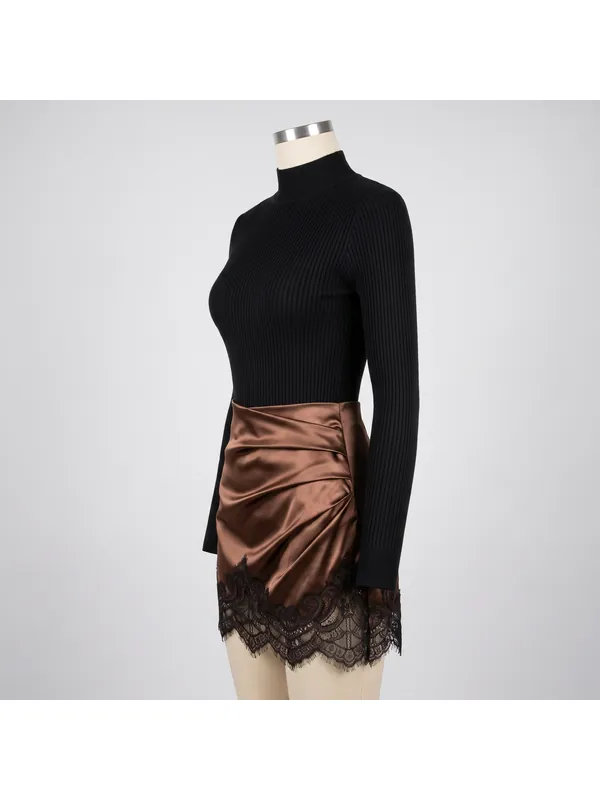 01 · Product
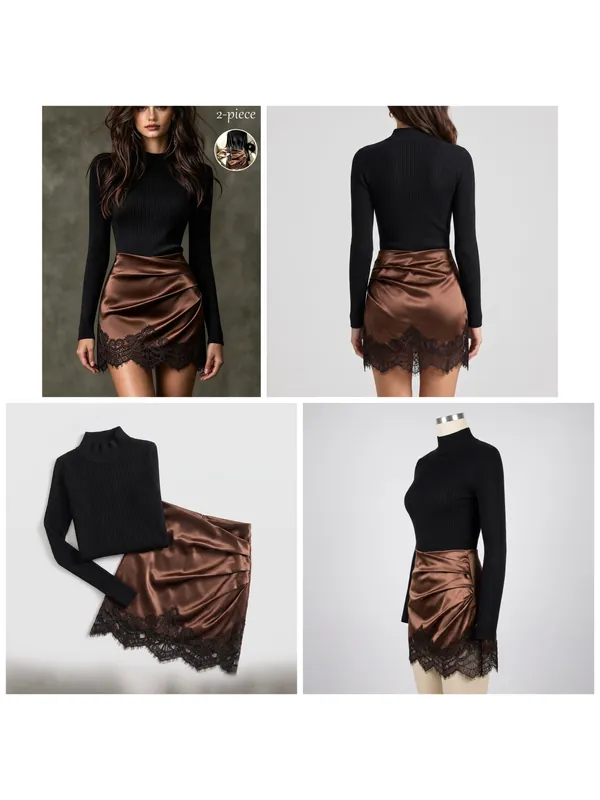 02 · Sheet
How it works
Product reference sheet in three steps
- 01Add a photo.
- 02Pick the settings, or keep the ready ones.
- 03Press Run. Each step hands its result to the next: Photo Edit → Make a Sheet.
What you need
What you need
- Product photoa photo
Good for
Good for
- Showing one product in every colour before it is made
- Catalogue and marketplace shots with no studio day
- Brand content that keeps the garment exactly as it is
- Creators who make content for fashion and product brands
- Brands that need more content than their shoots give them
Questions
About Product reference sheet
Is Product reference sheet free?+
Product reference sheet uses credits from your Aiphoria plan. You see the exact price before it starts, and new accounts get free credits to try it.
What is a workflow?+
A few tools in one run. Product reference sheet does 2 steps for you (Photo Edit, Make a Sheet), and you can change any step before you run it.
Can I use the results for brand and client work?+
Yes, on a paid plan: Aiphoria's paid plans include commercial rights. The free plan is for personal use.
Use it in a workflow
More workflows
 W24
One product, many colours
One product photo in every colour you list. No model needed.
 W25
Product in scenes
One product photo in every setting you list. No model needed.
 W26
Product with a model
Your model holding, wearing or using your product, in several shots.
 W27
Product from every angle
One product photo shown from the front, side, back, above and up close.
 W28
Product in the shop
Your product on a shop shelf, in a window, on a counter and on a street poster.
 W29
A week of posts
Five posts about one product that tell one story across a week.
Try Product reference sheet now
New accounts get free credits. You see the price before anything runs.